
Signing DCPs#
easyDCP Creator allows you to sign the package with your own digital certificates. Note: If you generate DCPs with one or more encrypted Tracks, the package shall be signed.
Signing a DCP#
To sign a package, open the Signature dialog by choosing “menu bar -> File -> Settings -> Activation Status -> Signature Setup”. The following dialog box should appear:
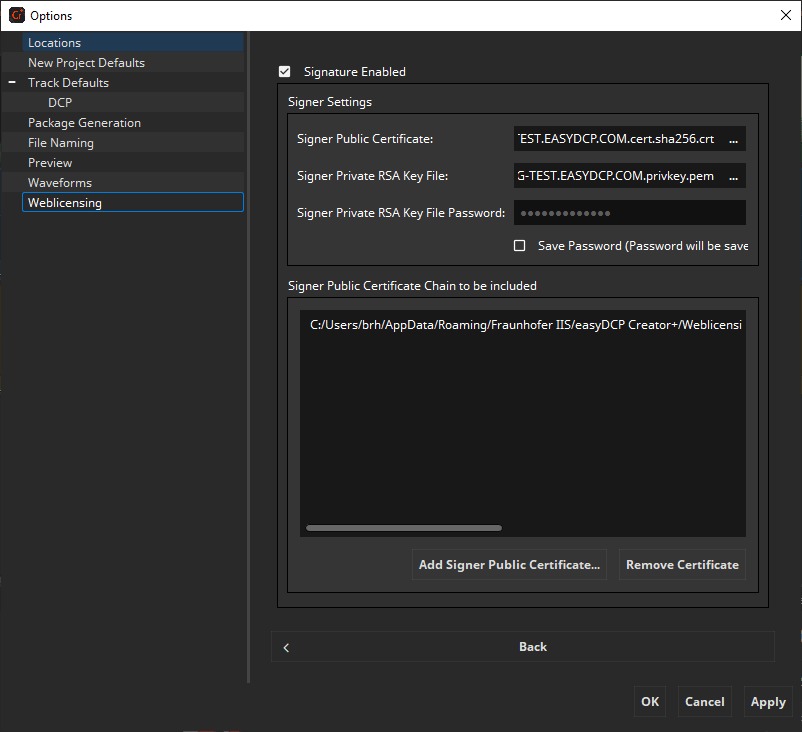
This dialog will automatically be filled with demo signer certificates during the first startup. If you purchase a license, you will receive your own signer certificates, containing your company’s URL.
Custom signer certificates can also be used. Check the Checkbox “Signature Enabled” and fill out the window “Certificate Chain to be included” with the entire certificate chain of your own signer certificate (including the self-signed root certificate). There should be a minimum of 3 certificates in the certificate chain. The signer certificate (leaf certificate) should not be included here. Enter a Signer Certificate File with your own private RSA key file. If your private key file itself is encrypted (which is strongly recommended), enter the password for this key file, otherwise leave this field empty.
To make sure all certificates and the certificate chain is valid please refer to the documents “SMPTE 430-2 D-Cinema Operations: Digital Certificate” and “Compliance Test Plan”, which you can find at www.dcimovies.com. It is very important to fulfill these specifications, otherwise problems may occur during ingest or playback of the package.