
Generate a DCP#
After adding content to compositions, press the “Generate Package…” button in the upper right corner of the main window.
A wizard dialog will appear to guide you through the generation process. The first page allows you to specify the destination folder for your package. It is recommended to name the folder with your package title and select a folder on an EXT-2 or EXT-3 formatted drive.
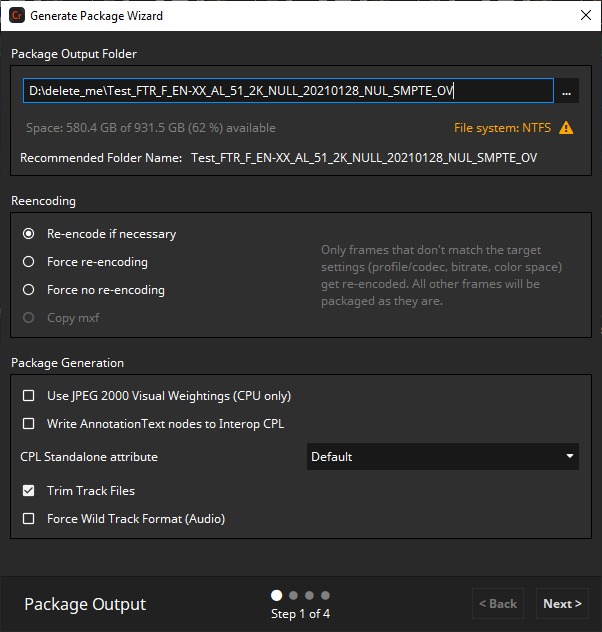
Re-encoding
For re-encoding a total of four options exist with different behaviors.
With the Force re-encoding option enabled, each source image file will be re-encoded, regardless if the source files are JPEG 2000 codestreams (*.j2c files and codestreams from MXF files) or not. This ensures that each final image will have the right format (i.e. the correct DCI compliant profile, bitrate, color gamut etc.).
Disabling force re-encoding option is only available in the full licensed version of easyDCP Creator, since the easyDCP logo will be burned into each picture frame at the top left. Thus, each picture has to be re-encoded.
The force no re-encoding option causes the codestreams to be packed directly into the final package. This may speed up the package generation process. The user has to make sure that the source files are already in the right format. No source file checks will be made, the source files will be copied directly into the package and just the mxf file will be written.
The copy mxf option is similar to force no re-encoding, but doesn’t even unpack the codestreams and just copy the whole mxf file. In this case even the mxf metadata has to be correct.
Using force no re-encoding or copy source option you are responsible for compatibility of the data with the selected package type in regards of codec/profile, resolution, colors etc.
With the re-encode if necessary option selected easyDCP Creator doesn’t check the input images if the input format is JPEG 2000 in terms of e.g. color space. easyDCP Creator checks image dimensions, bit depth, bitrate and wavelets only. Using this chain a user can create his own JPEG 2000 files in the post production and easyDCP Creator will just do the faster packaging. The advantage is that if any color processing is bypassed, packaging will be much faster.
To ensure that JPEG 2000 codestreams will be directly copied into the final package, the following settings must be done:
All source files shall be DCI compliant JPEG 2000 codestreams.
The JPEG 2000 codestream re-encoding shall be switched off.
The pillar-/letterboxing & scaling shall be switched off (see 5.1.7 Letterboxing & Scaling).
The source color space has to be XYZ.
Use JPEG 2000 Visual Weightings (CPU only)
Enable this option if you want to use visual weightings mechanisms in the JPEG 2000 encoding process. This settings only affects the package generation using CPU and improves the image quality at low bitrates.
Write AnnotationText nodes to Interop CPL
Some cinema projectors have problems when there’s more than one AnnotationText in a CPL. For compatibility you can disable this option.
CPL Standalone attribute
Some cinema systems complain about standalone attribute in some metdata files of the DCP being set to “yes”, but need to be “no”. The “Default” behavior will add no standalone attribute at all, which is interpreted as “yes”. If you need them to be set to “no” choose the “Force No” option.
Trim Track Files
Enabling this option causes unused frames being stripped from the mxf files. This happens as pre-processing step of the generation and can reduce generation time.
Example: Source sequence has 100000 frames, but just 1000 frames are used in the package. As a result just these 1000 frames are encoded while the remaining 99000 frames aren’t touched.
Force Wild Track Format
Some cinema servers require audio to use the wild track channel format instead of the digitical cinema labels. While this can be already configured when adding audio to the project (see 5.2.1) you can enforce wild track format by checking this option. The configuration then will be overwritten to use wild track format no matter what has been configured originally.
The next page allows specifying the maximum bitrate of the generated DCP. 250 Mbit/sec is the maximum bitrate for DCPs.
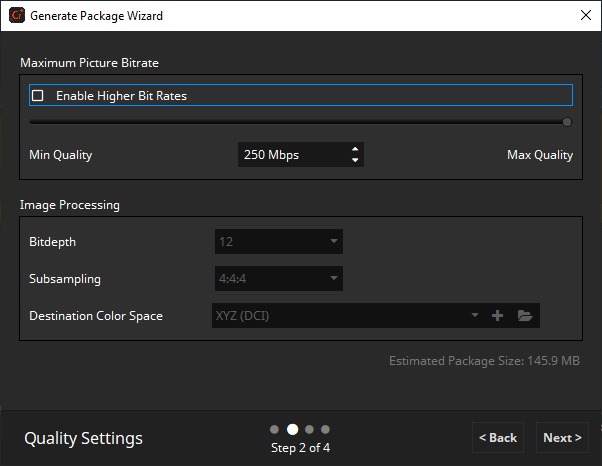
Keep in mind that a lower maximum bitrate can decrease the picture quality of the DCP.
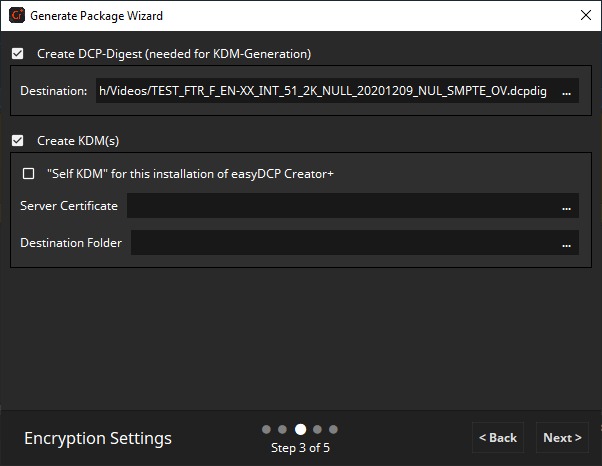
If your package contains at least one encrypted Track, you can also choose a DCP Digest and a KDM server certificate. Digest generation won’t be available when generating a supplemental DCP (see 11.2).
Destination Color Space
Select the color space your package shall be encoded to. For DCP that’s always XYZ, so the option can’t be changed.
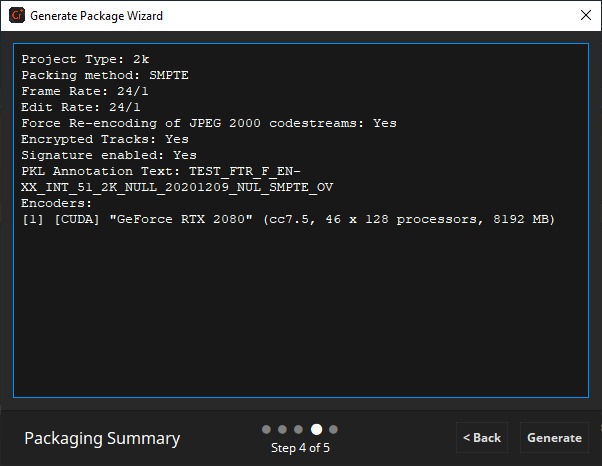
The next page will show a summary of your project configuration.
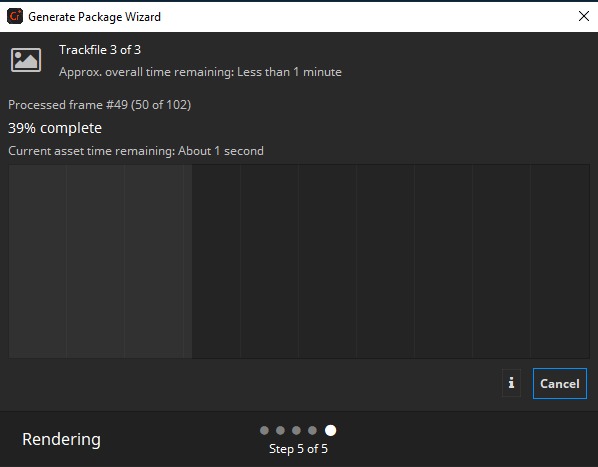
During the render process some statistics will be shown, like “Estimated Time Left” or the current rendering throughput.
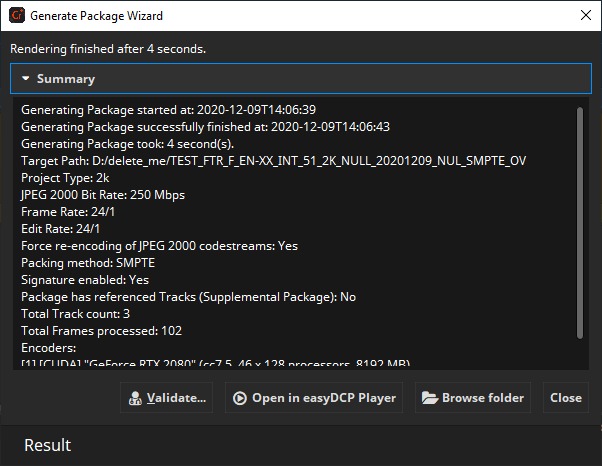
After the rendering process has finished the result will be shown on the last page of the generation wizard. Please have a careful look if there were any issues detected during the rendering process.
Here you also have the option to validate your project (see 14.5 Validator), open it for a
preview in easyDCP Player or browse the folder containing the package.
Why does easyDCP Creator generate KDMs since version 2.1?#
Beginning with version 2.1, easyDCP Creator is capable of opening encrypted DCPs and using these DCPs as basis for new DCPs. There are basically two ways of providing the keys in order to allow easyDCP Creatorto decrypt the content for the preview and for generating a new DCP.
If keys are provided by means of a proprietary Fraunhofer Digest file (*.dcpdig), you can generate and also save the package. In both cases a new digest valid for the generated/saved package is created.
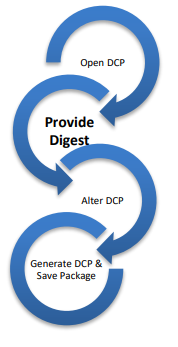
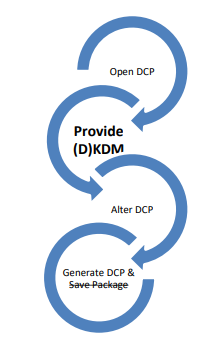
If one provides the keys by means of Distribution KDM (or KDM), easyDCP Creator does not allow to save the package as this would invalidate existing KDMs. In every case you need to generate a new package which will create a new (D)KDM and digest for the new package.
Using easyDCP Creator version 2.1 or higher you can generate a (D)KDM directly from within easyDCP Creator. The “Generate DCP…” dialog was extended to offer you to generate KDMs. By design, one (D)KDM will be generated for easyDCP Creator itself in order to make sure that one can open the DCP on the same computer using easyDCP Creator later. A second (D)KDM can be generated for another software being able to open (D)KDMs, including easyDCP KDM Generator+ and many other 3rd party hard-/and software tools.
Why can I not generate a Fraunhofer Digest file when generating DCP?#
Since version 2.1 of easyDCP Creator it is possible to open encrypted DCPs and to use these DCPs as a basis for new DCPs. There are basically two ways of providing the keys in order to allow easyDCP Creator to decrypt the content for the preview and before generating a new DCP.
If one provides the keys by a Fraunhofer Digest, we assume that the user generated the content and that he is in charge of the source content used for the first DCP generation. In such a case you can do everything in easyDCP Creator, including the deactivation of the encryption and the generation of a new Digest when generating a new DCP.
If one provides the keys by a Distribution KDM (or KDM), easyDCP Creator does not allow to generate the Fraunhofer Digest in case the source package is a supplemental DCP. In order to understand this behavior we have to explain that the Fraunhofer Digest stores the encryption key as plain text on the hard drive. Without disabling the Digest-option one could easily open an encrypted DCP together with a (D)KDM, generate a new encrypted DCP and store the encryption keys in plaintext. Since content-owners are very diligent with their content, Fraunhofer IIS decided to disable the option since version 2.1.
Why can I generate a KDM with easyDCP Creator? Do I still need the easyDCP KDM Generator?#
Please study the answer to the question “Why does easyDCP Creator generate KDMs since version 2.1?” in order to learn, why easyDCP Creator (version 2.1 or higher) allows for the generation of (D)KDMs. Please notice that one can only generate one (D)KDM when generating a new DCP. For the generation of many KDMs, easyDCP KDM Generator is still the software of your choice allowing you to generate unlimited KDMs with a simple click.