
Audio Routing#
Different mechanisms are used to identify audio channels carried in MXF Sound Track Files within Digital Cinema Packages (DCP). Playback systems rely on such information for eventually outputting sound to connected loudspeaker setups.
This chapter describes configuration options for easyDCP Player+ and explains routing mechanisms for different package types.
Audio Channel Identification#
Interop DCPs#
Interop DCPs usually don’t carry explicit audio channel configuration information. The Inter-Society Digital Cinema Forum (ISDCF) recommends the channel layout specified in Table 1. Theater operators rely on the optional use of the Digital Cinema Naming Convention [5] in order to identify the channel layout correctly. See [7] for more details.
Table 1 - Recommended Audio Channel Assignments for Interop DCPs
Channel |
5.1 |
7.1 SDDS |
7.1 DS |
Speaker Position |
1 |
L |
L |
L |
Left |
2 |
R |
R |
R |
Right |
3 |
C |
C |
C |
Center |
4 |
LFE |
LFE |
LFE |
Low Frequency Effects |
5 |
Ls |
Ls |
Lss |
Left Surround (Left Side Surround) |
6 |
Rs |
Rs |
Rss |
Right Surround (Right Side Surround) |
7 |
HI |
Hearing impaired (with emphasis on dialog) |
||
8 |
V-N |
Visually impaired narrative (audio description) |
||
9 |
Lc |
Left center |
||
10 |
Rc |
Right center |
||
11 |
Lrs |
Left rear surround |
||
12 |
Rrs |
Right rear surround |
||
13 |
Motion Data |
Synchronous signal (e.g., used by D-Box) |
||
14 |
Sync Signal |
Used for external sync – not used for Interop DCP |
||
15 |
Unused |
|||
16 |
Unused |
SMPTE DCPs#
Most of today’s SMPTE DCPs use an audio channel assignment label in the Sound Track File metadata to identify the audio channel order in the file. SMPTE ST 429-2 [1] describes five different configurations, which can be identified by the associated label:
5.1 + HI/VI-N
6.1 + HI/VI-N
7.1 SDDS Layout + HI/VI-N
16 Channels “Wild Track Format” (WTF)
7.1 DS Layout + HI/VIN
Table 2 - Standard Audio Channel Assignments for SMPTE DCPs
Channel |
5.1 + HI/VI-N |
6.1 + HI/VI-N |
7.1 SDDS + HI/VI-N |
Wild Track Format |
7.1 DS + HI/VI-N |
1 |
L |
L |
L |
CH1 |
L |
2 |
R |
R |
R |
CH2 |
R |
3 |
C |
C |
C |
CH3 |
C |
4 |
LFE |
LFE |
LFE |
CH4 |
LFE |
5 |
Ls |
Ls |
Ls |
CH5 |
Ls |
6 |
Rs |
Rs |
Rs |
CH6 |
Rs |
7 |
HI |
Cs |
Lc |
CH7 |
Lrs |
8 |
VI-N |
not used |
Rc |
CH8 |
Rrs |
9 |
HI |
HI |
CH9 |
||
10 |
VI-N |
VI-N |
CH10 |
VI-N |
|
11 |
CH11 |
||||
12 |
CH12 |
||||
13 |
CH13 |
||||
14 |
CH14 |
||||
15 |
CH15 |
||||
16 |
CH16 |
Of course, not all DCPs actually contain HI and/or VI-N channels. Whether these channels are present can be determined by checking the channel count, which is also indicated in the Sound Track File metadata. For example, config #1 (5.1 + HI/VI-N) combined with a channel count of “6”, indicates that no HI/VI-N channels are present in the corresponding Track File. That being said, some facilities add silent channels for missing HI/VI-N channels, which makes it difficult to determine whether useful HI/VI-N channels are present, or not. DCPs containing Dolby Atmos® [6] Sound Tracks require a sync signal added to the “traditional” 5.1 / 7.1 Sound Track File. Since such a channel can only be included in channel assignment #4 (WTF), the content of the remaining audio channels present in this Sound Track File remains unclear.
The 2013 version of SMPTE ST 429-2 [2] adds support for Multi-Channel Audio (MCA) Labeling, which is defined in SMPTE ST 377-4 [3]. Sound Track Files using this, contain a number of SubDescriptors in the Wave Audio Essence Descriptor. These SubDescriptors, besides other things, identify and describe every audio channel present in the MXF file and leave no room for ambiguity.
SMPTE 429-16 [4] defines a way to carry additional (machine-readable) metadata in CPLs. Besides other things, sound configurations can be stored for Sound Track Files that are referenced by the CPL in that metadata. While the standard document was released in 2014, hardly any DCPs in the field include this metadata as of today.
Configuration and output behaviour#
Within the audio channel order dialog (Options -> Audio -> Edit button next to Input Channel Order selection) audio channel maps can be defined. An audio channel map describes, what audio channels are contained in a source and how they are laid out. The audio input channel order is retrieved from the input MXF Sound Track File, if possible. If the audio channels are not labeled in the Track File at all, a default channel order is used.
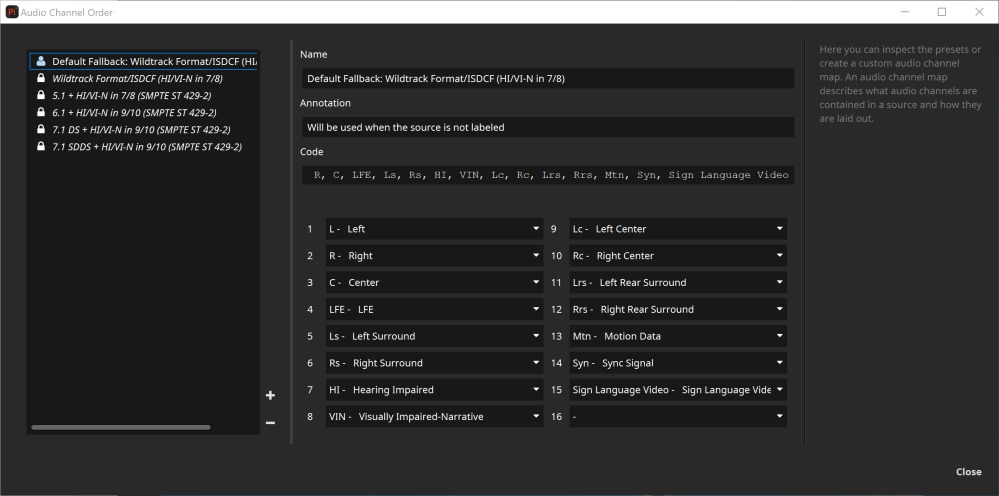
By default, several presets are available. For example “Wildtrack Format/ISDCF (HI/VI-N in 7/8)”, which is the most widely used format for Interop and SMPTE DCPs. New custom presets can be created from scratch by clicking and configuring the channels, or by copying and pasting one of the presets’ “code” field. The presets tagged with a lock cannot be edited, so that they don’t get accidentally changed.
Output Channel Mapping
Within the audio channel routing dialog (Options -> Audio -> Edit button next to Output Channel Mapping selection) the audio channel mix can be defined. An output channel mix describes the currently used speaker setup. It’s possible to mix multiple input channels (in the screenshot below the header of the table) to the same output channel (e.g. 5.1 to Stereo Downmix, in the screenshot below the first column of the table). Optionally, an entire routing can be set to lossless. In this case the volume setting takes no effect. Additionally only a single input channel can be assigned to an output channel. If the channel routing lists more channels than present in the current source, the excessive channels will simply be ignored.
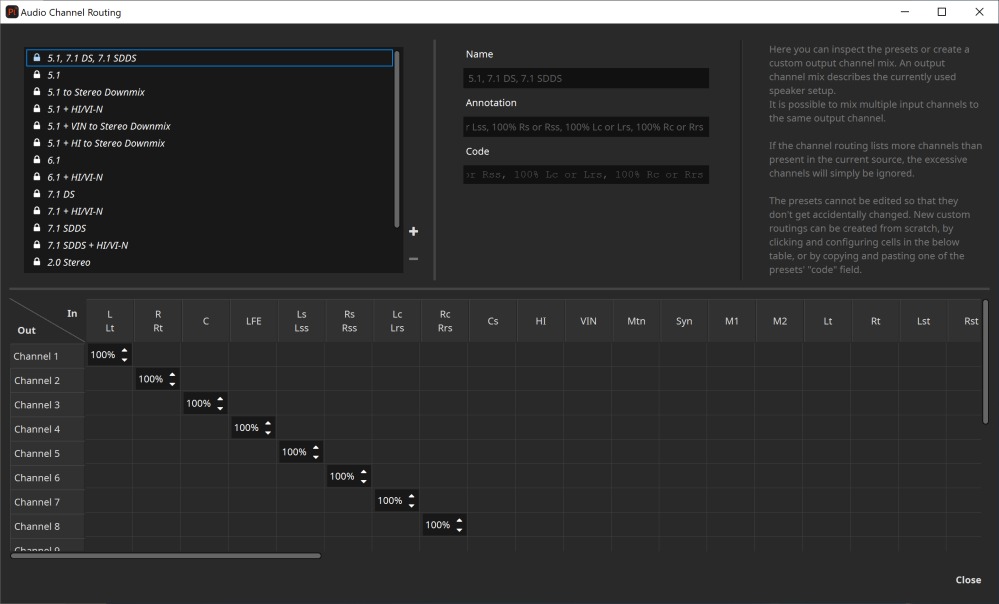
By default, several presets are available. New custom presets can be created from scratch by clicking and configuring cells in the table below, or by copying and pasting one of the presets’ “code” field. The presets tagged with a lock cannot be edited, so that they don’t get accidentally changed.
The available audio channel symbols are listed in the following table:
Symbol |
Description |
Package Type |
L |
Left |
DCP |
R |
Right |
DCP |
C |
Center |
DCP |
LFE |
Low Frequency Effects |
DCP |
Ls |
Left Surround |
DCP |
Rs |
Right Surround |
DCP |
Lss |
Left Side Surround |
DCP |
Rss |
Right Side Surround |
DCP |
Lrs |
Left Rear Surround |
DCP |
Rrs |
Right Rear Surround |
DCP |
Lc |
Left Center |
DCP |
Rc |
Right Center |
DCP |
Cs |
Center Surround |
DCP |
HI |
Hearing Impaired |
DCP |
VIN |
Visually Impaired Narrative |
DCP |
Behaviour#
If a Sound Track Files signals an audio channel configuration, this configuration is taken into account. If not, the configured Input Channel Order is used.
The output channel configuration is taken from the selected output channel mapping accordingly. If the number of channels exceeds the number of channels actually supported by the selected output device (e.g. soundcard), all channels exceeding this count remain unused.
If a package contains channels, for which there is no output channel configured, these channels are ignored and not played out. If no Lt/Rt output channels are specified, they are routed to the L/R output channels (if present).
Configuration and output examples#
Using a standard 2.0/5.1 speaker setup#
For this setup the already available presets should be sufficient. For input channel order choose the preset “Default Fallback: Wildtrack Format/ISDCF (HI/VI-N in 7/8)”. For output channel mapping use “5.1 to Stereo Downmix” or “5.1”.
The DCP Sound Track File contains the audio channel assignment label #4, which indicates “Wild Track Format”. Since this configuration does not specify a discrete channel layout, the preset will be used for the number of channels present in the Sound Track File.
The input channels are then routed to the matching output channels, as specified in the output channel mapping preset.
Fixing swapped channels#
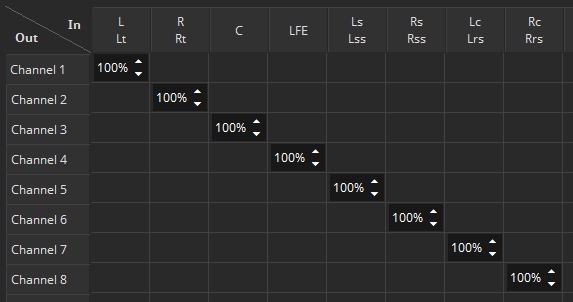
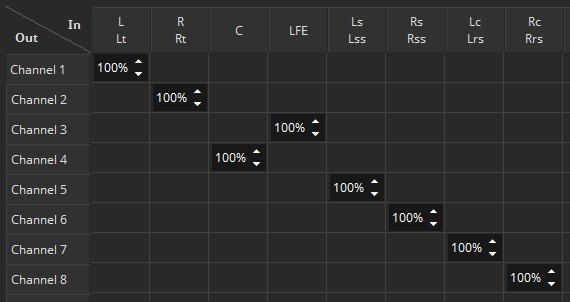
Let’s assume the Center channel and the LFE channel are mixed up in your output device. In that case, a new output channel mapping preset has to be created, based on the already existing one “5.1, 7.1 DS, 7.1 SDDS”.
Original preset “5.1, 7.1 DS, 7.1 SDDS”:
New preset, where Center and LFE Channel are swapped:
Footnotes