
Distribution KDM#

esyDCP KDM Generator+ can read Distribution KDMs (DKDM). A DKDM is technically identical to a regular KDM. The difference is that it targets another mastering station instead of a cinema server. A scenario would be if a post production house is contracted to create KDMs for a number of cinemas or a whole region or country. The supplier would provide a single DKDM issued to the post production house’s easyDCP KDM Generator+ installation. This enables them to supply a new group of recipients with KDMs containing the same keys as the original DKDM. The procedure is identical to generating regular KDMs. The post production house does not even have to have a copy of the DCP itself.
Each installation manages its own private key and public key. The private key is known only to your easyDCP KDM Generator+ installation, whereas the public key is contained in a public server certificate and may be distributed to content providers. When content providers choose to encrypt a DCP, they need to somehow provide the decryption keys (there is one key for every encrypted track file) to the play out system or mastering station. To ensure that no one else is able to read these sensitive decryption keys, they are themselves encrypted in a way that only the targeted system is able to decrypt them. To do this, the content provider will need the recipient’s public server certificate (export certificate with ‘F7’). This encrypted message is called a Key Delivery Message (KDM). When the KDM does not target a digital cinema server, but rather another mastering station in the post-production or distribution chain, it is referred to as a Distribution KDM (DKDM). easyDCP KDM Generator+ does not keep loaded DKDMs in a repository.
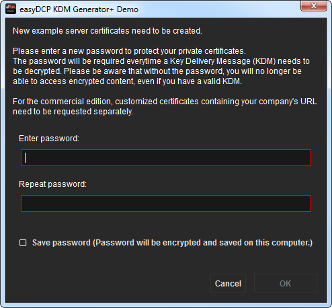
When the easyDCP KDM Generator+ demo is first started, it will create a new random private key as well as a public server certificate. The certificate is digitally signed by four other certificates. These certificates are referred to as a certificate chain and this certificate chain, even though already included in the public server certificate, is additionally saved in a separate file. The certificate’s critical private key is not only protected by a user password, but it is also asynchronously encrypted to ensure maximum security of encrypted DCP content. Likewise, if the user chooses to store their password for convenience, the saved data still needs to be asynchronously decrypted. The user password needs to have 8 to 12 letters and cannot be changed after it was created. The user will be prompted to specify a password when the application first launches.
The commercial edition, on the other hand, does not auto-generate certificates. Instead certificates are requested and imported with the “Request License & Certificates” and “Import License & Certificates” option in the help menu. These certificates are meant for commercial use as they state the licensee’s URL and have a unique serial number that links the certificates to the license. Such certificates are tied to the machine’s easyDCP system hash. When the license should need to be migrated to another machine, a new certificate set will have to be requested.
All mentioned files are stored in the user application data folder’s certificates subfolder (see 6.1). Hence, the OS user management can be used to maintain multiple sets of certificates. In order to easily determine which files belong together, they are each identified by a unique ID. The ID of the set that is currently used by easyDCP KDM Generator+ is also listed in the “about” dialog (hit ‘F6’).
easydcpkdmgen_<ID>.privkey.pem contains the encrypted private key
easydcpkdmgen_<ID>.cert.sha256.crt is the public server certificate
easydcpkdmgen_<ID>.chain.sha256.pem contains the certificate chain
easydcpkdmgen_<_<ID>.privkey.passwd contains the encrypted user password
When easyDCP KDM Generator+ is uninstalled, none of these files will be removed. If the user password file (*.passwd) is manually deleted, the user will simply be prompted for the password again the next time a DKDM is loaded.
In the demo version, if any of the other three files are removed, all remaining files will be renamed (to <original filename>.bak) and a new private key along with new certificates will be created. The user will also be asked to specify a new password.
Application Data and Settings#
easyDCP KDM Generator(+) automatically creates an application data folder. It contains a settings file as well a folder for its automatically generated certificates.
The settings file is used to store settings across program starts. It contains several user settings (e.g. default output folder, KDM conformity mode, signer certificates, etc) and will be refreshed each time easyDCP KDM Generator is closed. Most standard parameters can be set from within the graphical user interface.
On Windows, it is located in <User Application Data>/Fraunhofer IIS/easyDCP KDM Generator/ and <User Application Data>/Fraunhofer IIS/easyDCP KDM Generator+/
The user application data folder is often in “C:/Documents and Settings/<username>/Application Data/
The user application data folder is often in “C:/Documents and Settings/<username>/Application Data/